 Streamgrab
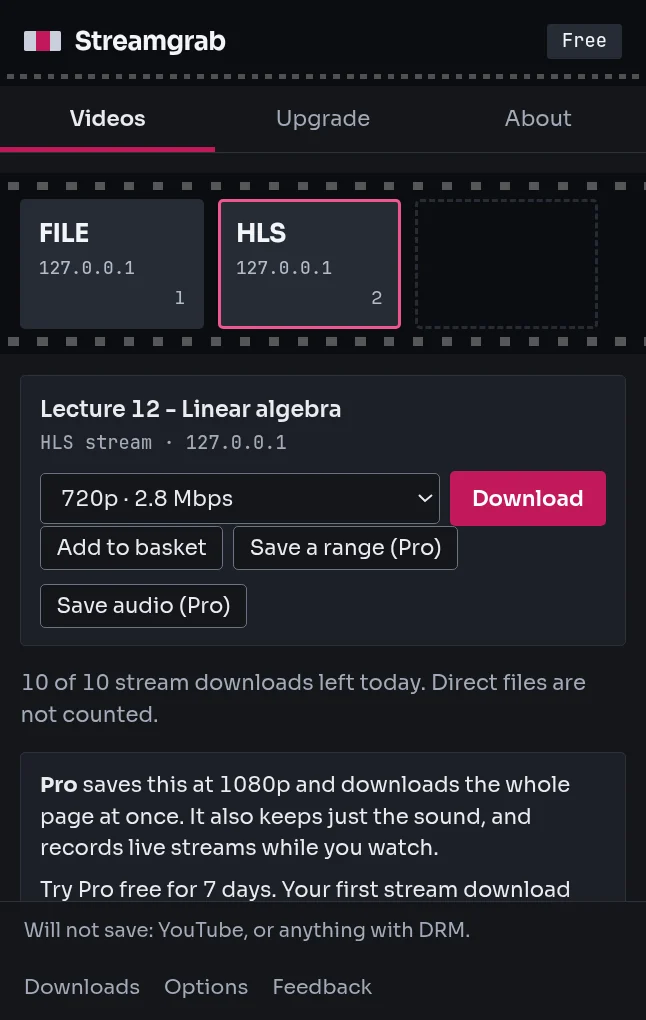
This lecture plays in the browser but there is no download button.
Save streaming videos (HLS, M3U8, DASH) as a single MP4, with sound, right in your browser. Streamgrab finds the video a page loads and saves it as a file, with no companion app and nothing stamped on the result. It does not download YouTube or DRM-protected video.
For Chrome, Microsoft Edge and Firefox on desktop. No account.
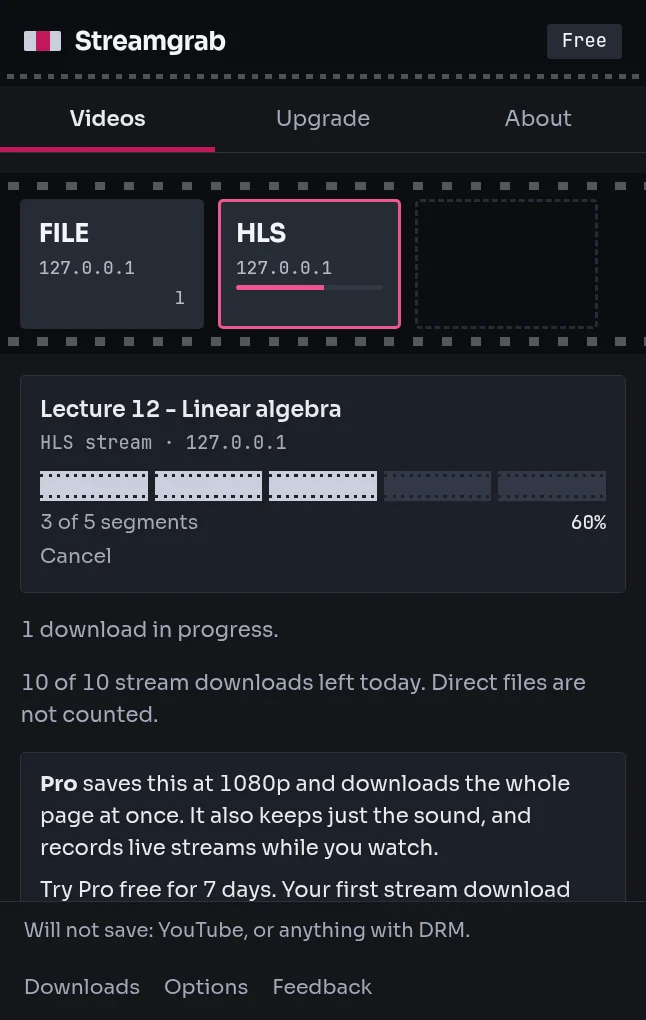
Watch the pieces join
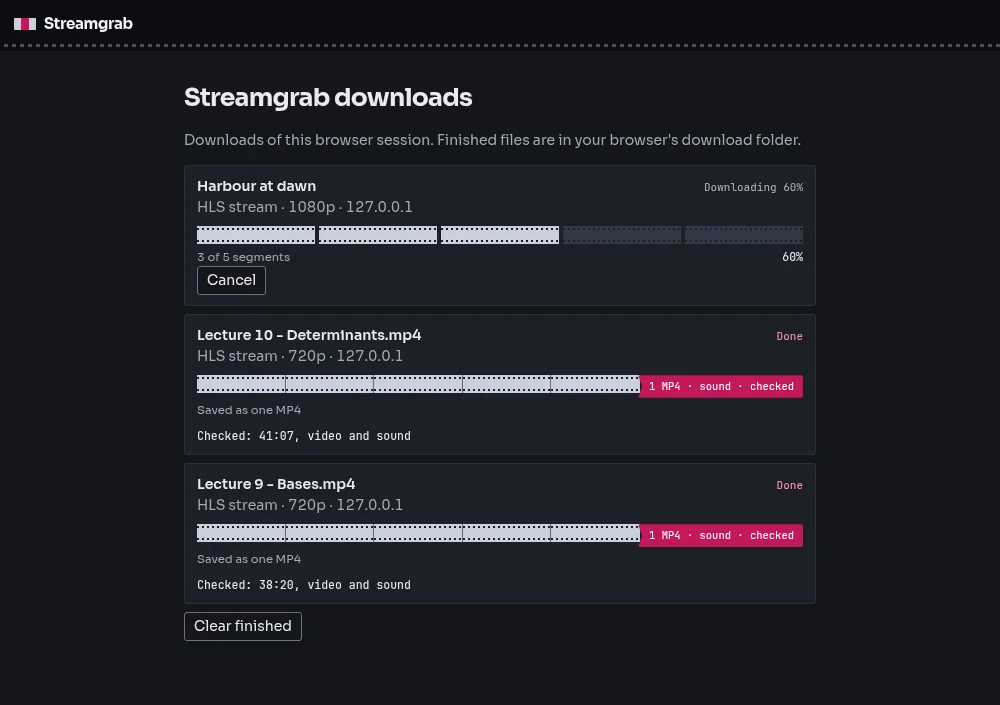
Each segment of a stream shows as a piece of perforated film, dark until it arrives. When all are in, the gaps close, the pieces become one MP4 on your computer, and a crimson splice clip snaps shut on the end once the file has been read back. The Downloads page follows every job the same way.
What it saves, and what it does not
When a video file, an HLS playlist (.m3u8) or a DASH manifest (.mpd) loads on the page, the toolbar icon gets a number. Open the popup, pick a quality and press Download.
- Direct video files (MP4 and WebM): saved as they are.
- HLS streams: the segments are fetched, decrypted when the stream uses plain AES-128 with its own key, and joined into one MP4 on your computer. MPEG-TS pieces are converted to MP4. If a stream cannot be converted, it is saved as a .ts file and the Downloads page says so.
- Audio only (Pro): the sound of an HLS or DASH stream as an .m4a file. Audio that is not AAC is saved as it is, in its own container, and the Downloads page says so.
- Live HLS streams (Pro): Record follows the playlist and ends when you press Stop, the stream ends, or the server stops answering. A recording is saved as numbered MP4 parts every 30 minutes, or as one file if Options say so; a part that cannot be converted is saved as a .ts file.
- DASH streams: one video track and one audio track are fetched and saved as one MP4 file. WebM streams still come as separate video and audio files, and the Downloads page says so.
It does not save: YouTube (Streamgrab refuses youtube.com and the servers that deliver its video); anything protected by DRM, meaning HLS with SAMPLE-AES or Widevine, PlayReady or FairPlay keys, and DASH manifests with ContentProtection; and live DASH streams. A live HLS stream can be recorded on Pro, until you press Stop or the stream ends. The popup says plainly when a video is protected. A server that checks where each request comes from may refuse the download.
Streamgrab next to Video DownloadHelper
Read on 3 October 2026 from the Firefox Add-ons page and from search snippets of review pages, so the complaints are marked reported. Streamgrab is our own tool; check the vendor pages before you decide.
| Topic | Video DownloadHelper | Streamgrab |
|---|---|---|
| Users and rating | About 1.85 million users and 4.3 stars on Firefox Add-ons | New, with no reviews yet |
| Companion app | Reviewers report that one is required (reported) | None. Segments are fetched and joined in the browser |
| Watermark | Reviewers report one on some unlicensed HLS and DASH video (reported) | None, on Free or Pro |
| Free limits | Reviewers report one HLS download per 120 minutes on free Chrome (reported) | Direct files unlimited. HLS and DASH streams up to 720p, one at a time |
What free does
The free version saves every direct file and one stream at a time up to 720p, with no account and no card.
- Direct video files (MP4 and WebM) without limit
- HLS and DASH streams up to 720p, one at a time, with no daily count
- No watermark on anything you save, free or Pro
- A quality list read from the stream itself: resolution and bitrate, duplicates folded, the one playing now first
- Every finished MP4 is read back and checked for picture, sound and length
- A collection of streams, downloaded in order as 01, 02, 03
- Will not save: YouTube, or anything with DRM
- Progress in the popup and on the Downloads page, with Cancel and Try again. Failed segments are retried before the download gives up
- No companion app. The pieces are fetched and joined in the browser
- The pages you visit and the videos you save stay on your computer. Sent: your licence key when it is checked
Pricing
Free saves direct files without limit and HLS or DASH streams up to 720p, one at a time. Pro removes the 720p cap, runs three downloads at once, and adds Download all, Retry failed and Pause all on the collection, saving a range, audio-only .m4a files, subtitles as .srt, saving to disk, live HLS recording with a timed stop, a save folder and filename templates with folders, and costs €29 for Lifetime or €15 for 1 year.
7 days of Pro, free, no card. When the week is up the Pro features switch off and your saved videos stay.
| Feature | Free | Pro |
|---|---|---|
| Direct video files (MP4 and WebM) | Unlimited | Unlimited |
| HLS and DASH downloads | One at a time | Unlimited |
| HLS and DASH quality | Up to 720p | Any |
| Streams downloading at the same time | 1 | 3 |
| Download every stream on a page | Not included | Included |
| Collection: collect streams while you watch, download them in order | Up to 500 streams | Up to 500 streams |
| Save a range of a stream (start and end time) | Not included | Included |
| Save only the audio of a stream (.m4a) | Not included | Included |
| Record a live HLS stream until you press Stop | Not included | Included |
Filename templates and folders ({title} {site} {collection} {date} {quality}) |
Not included | Included |
| Subtitles as .srt | Not included | Included |
| Save to disk as it downloads, to a place you choose (Chrome and Edge) | Not included | Included |
| Retry failed and Pause all on the collection | Not included | Included |
| Copy a yt-dlp script for the collection | Included | Included |
| Stop a live recording at a time or after minutes | Not included | Included |
| Save every file into one folder you choose, with no dialog | Not included | Included |
| Watermark on the saved video | None | None |
| Browsers per licence | Not applicable | Up to 3 |
| Price |
€0 forever No account, no card Add to Chrome Add to Edge Add to Firefox |
€29 Lifetime €15 1 year €9 6 months Get Lifetime Get 1 year Get 6 months |
7 days of Pro, free, no card. Trial: above 720p saves a 60 s sample, one download at a time. How buying works.
Founding offer: 30% off 1 year and Lifetime, first 20 orders. Code B41BCI9PKO. Enter it at checkout.
Questions
- Is there an HLS downloader extension for Edge?
- Yes. Streamgrab is a free extension for Microsoft Edge on desktop, and for Chrome and Firefox. It reads the HLS playlist the page loads, fetches the segments, and joins them into one MP4 file on your computer.
- How do I download an m3u8 video?
- Open the page and play the video. When Streamgrab shows a number on its toolbar icon, open it, pick a quality from the list and press Download. The m3u8 playlist is read for you, so you do not need to find its address.
- How do I download an MP4 from any website?
- Play the video and open Streamgrab. Direct MP4 and WebM files are listed with their size, and are saved as they are, without a limit, on the free plan too.
- Does it work without a companion app?
- Yes. The pieces of a stream are fetched and joined in the browser, so there is nothing else to install and no account to make.
- Which browsers does it work in?
- Chrome, Microsoft Edge and Firefox, on desktop.
- Does it download YouTube?
- No. Streamgrab refuses youtube.com and the servers that deliver its video.
- Does it download DRM-protected video?
- No. HLS with SAMPLE-AES or Widevine, PlayReady or FairPlay keys, and DASH manifests with ContentProtection, are recognised and the popup says they cannot be downloaded. Live DASH streams are not saved, and live HLS recording is part of Pro.
- Does a DASH download give one file?
- DASH keeps video and audio apart. Streamgrab joins them and saves one MP4 file. With Save to disk (Pro) the file is written as it arrives and video and audio stay two files. A WebM stream comes as separate video and audio files, and the Downloads page says so.
- What if a stream is very large?
- Streamgrab joins a stream from files in the browser's private storage, so size is limited by free disk space; a stream that lists more than 50,000 pieces is refused with a message before anything is saved. A browser without private storage keeps the job in memory and stops at about 2 GB.
- Why does it ask for access to all websites?
- A video can load from any site. Streamgrab has to see the content type and size of the requests a page makes to tell which ones are video, and needs the same access to fetch playlists and segments from the servers that host them. It does not block requests or read page text. In Chrome, Edge and Firefox, downloads carry the page's address (origin only) as Referer to the video server.
- How long does Pro last?
- €29 Lifetime lifts the 720p cap and the one-at-a-time limit. €15 for 1 year lifts them for 12 months. One licence works in 3 browsers.
- How do I activate Pro?
- Pay on Payhip, copy the licence key from the receipt or the email, open the Streamgrab popup, press the plan badge at the top, paste the key into Licence key and press Activate. See pricing.
- Where do I get help, or send an idea?
- Write to [email protected] for help. To suggest a feature or report a problem, use the form on the roadmap page or in the extension.